necodoc / Product

Product

Everything necodoc does, with the limits up front.

Fill a PDF you already have, or design one from scratch. Both share the same fields, publishing and API.

Core capabilities

01Overlay on existing PDFs

Put your data on the form the obligee published.

Place typed boxes on any PDF and map each to a field. The output is the original page with your data on it.

  • Box types: text, multiline, number, date, checkbox, image, signature, QR code and barcode
  • Import the AcroForm fields a fillable PDF already has
  • AI proposes boxes on flat forms; an editor accepts each one. Off unless you add a key
  • Auto-shrink per box, uploaded TTF or OTF fonts, empty-password and hybrid XFA PDFs
Limit: No pure XFA forms or PDFs that need a password to open. AI detection checks the first 20 pages and is untested on scans.
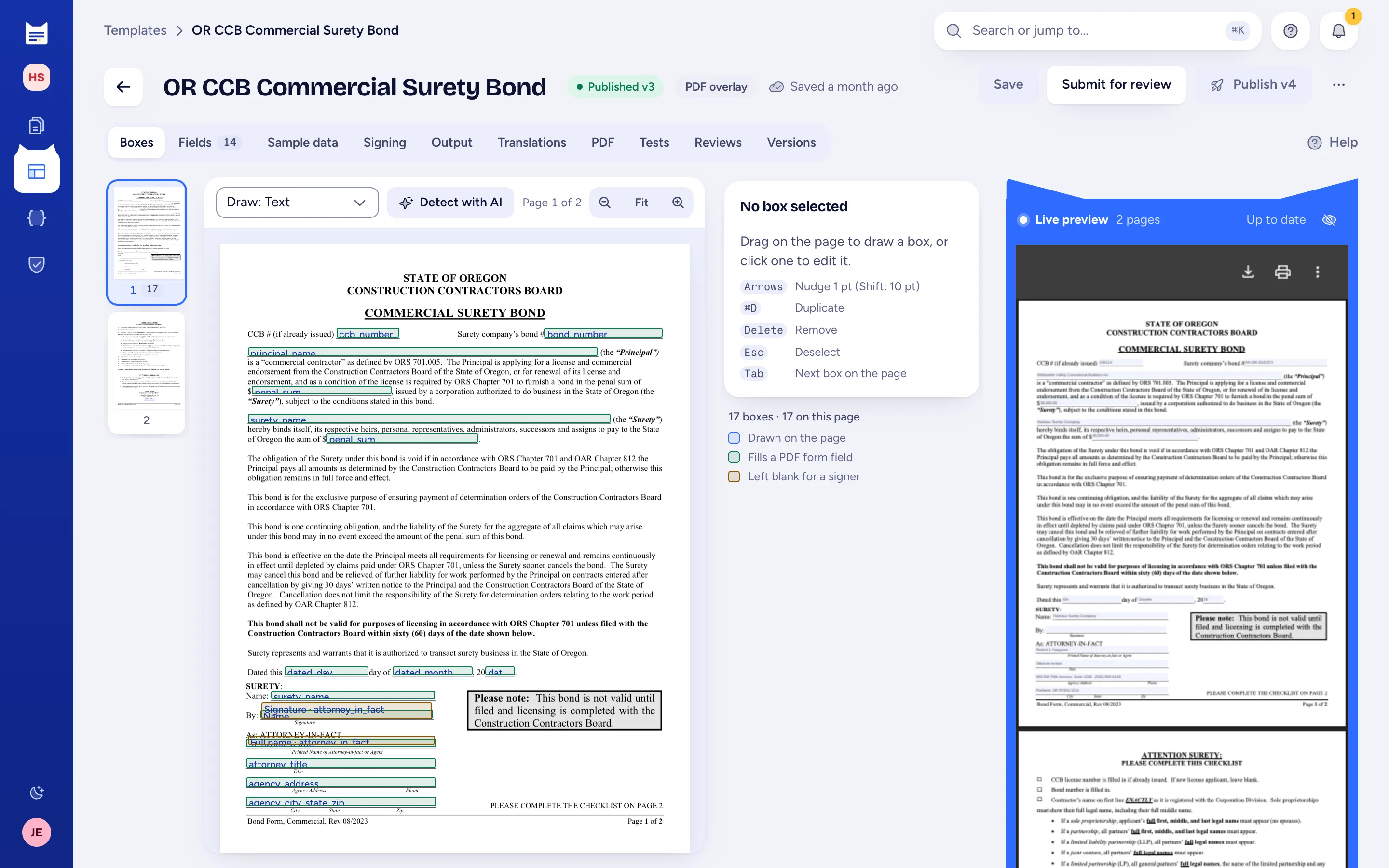
Example: Oregon CCB commercial surety bond
Overlay editor: typed boxes drawn on the Oregon CCB commercial surety bond with a live preview

02Designed templates

Design a document from scratch, with real headers and footers.

Forms staff write in a rich-text editor, and developers can switch to code mode. The preview runs the production renderer.

  • Header and footer bands with page numbers and a first-page variant for a letterhead
  • Merge fields, show-if sections, repeating rows, tables, images and page breaks
  • Themes for house style; snippets for shared clauses, included by key
  • Liquid throughout, with date, number, currency, qrcode, barcode and t filters
  • Code mode: raw HTML and Liquid when the editor can't express it
Limit: Code mode doesn't convert back to the visual editor. No JavaScript in templates, footnotes or balanced columns.
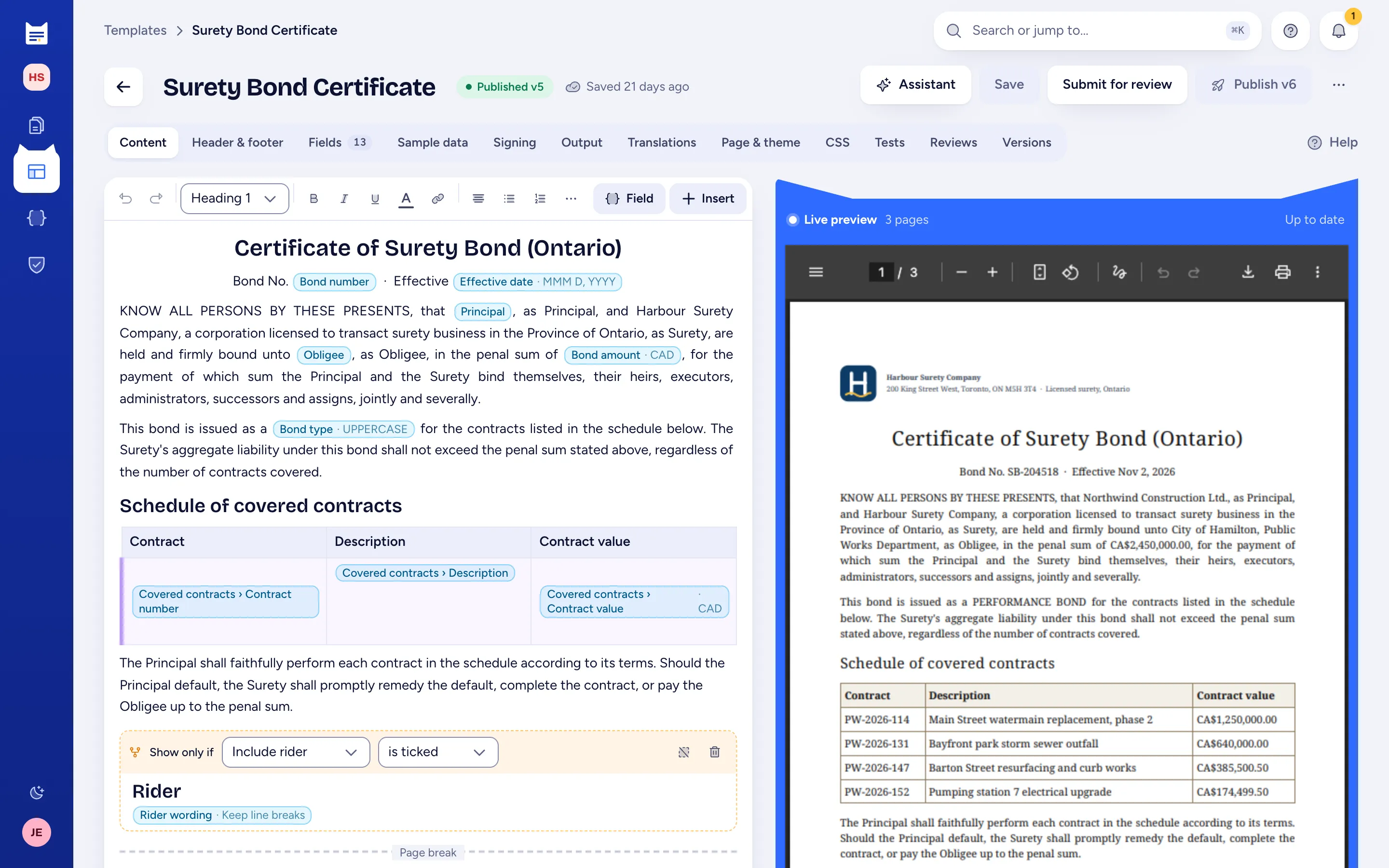
Example: certificate of surety bond, Ontario
Designed template editor with typed merge fields and a live PDF preview

03Fields, conditions, guided forms

One field list drives the form, the API and the schema.

Define typed fields once. They become the guided form, the API's validation and a JSON Schema per published version.

  • Text, long text, number, date, boolean, choice, email, image, signature and repeating groups
  • Required, min and max, patterns, decimals; sensitive fields masked in logs
  • Step-by-step form with sections that appear only when they apply
  • The API answers 422 with every field error at once
Limit: A show-if compares one field with one value; no AND/OR groups, computed fields or cross-field checks yet.
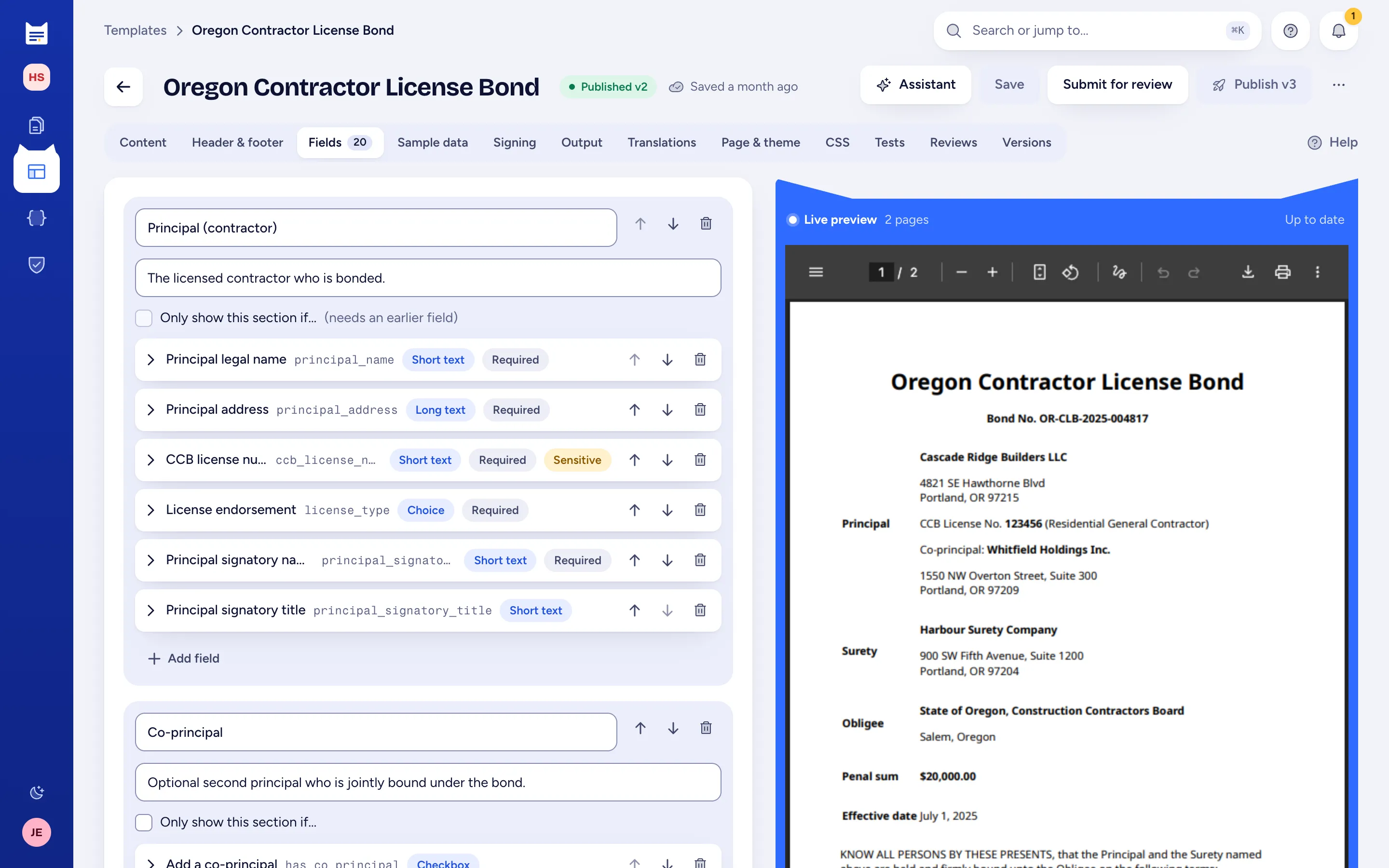
Fields tab: principal fields with types, required and sensitive flags, beside a live preview of the bond
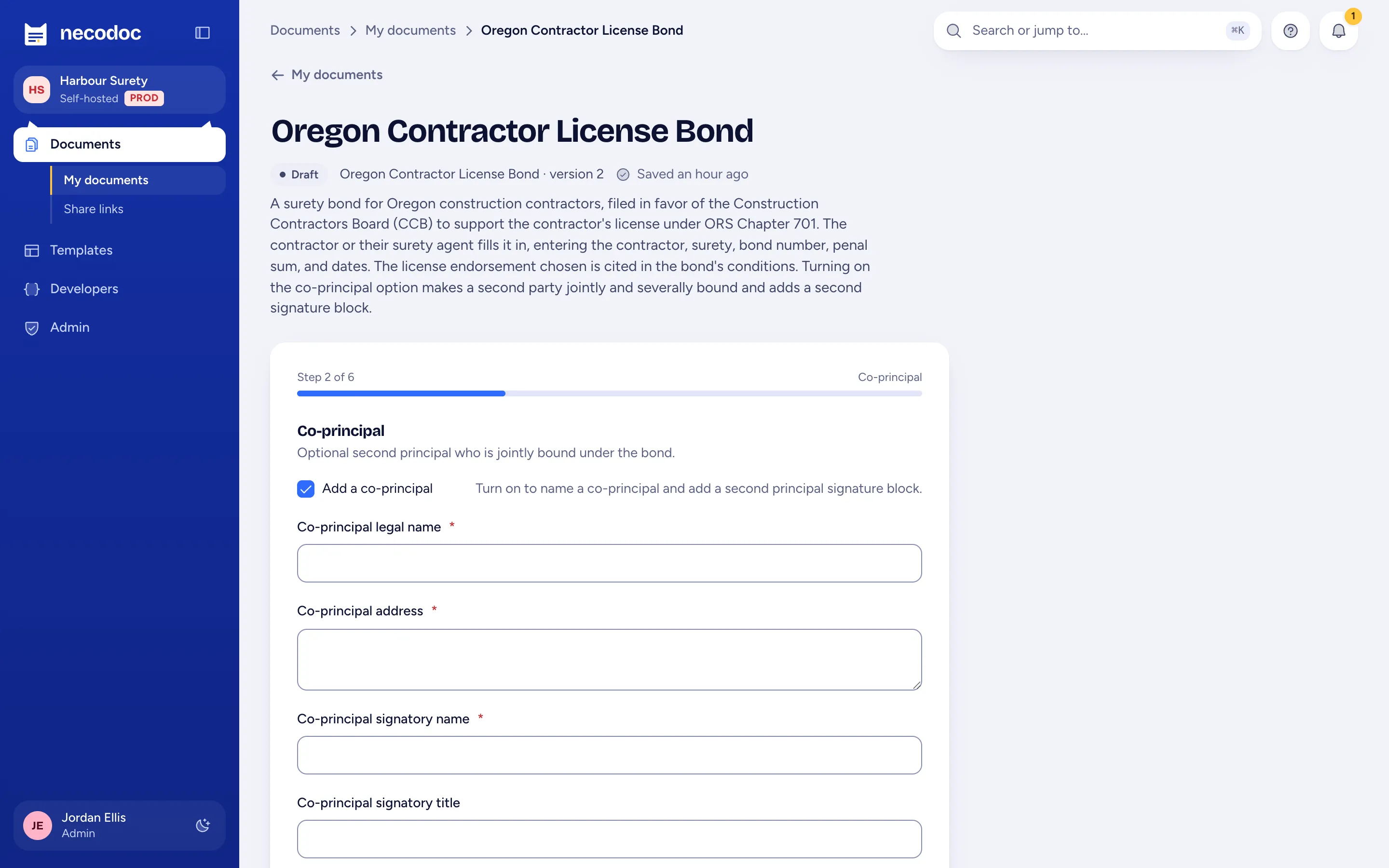
Guided form, step 2 of 6: the co-principal section shown because Add a co-principal is ticked

04HTML to PDF API

A versioned API your core systems can depend on.

Post HTML, or generate from a published template version. Everything is under /api/v1, described by OpenAPI.

  • Synchronous, asynchronous with a signed webhook, or batch
  • Keys for people or service accounts: scopes, template allowlist, IP allowlist, expiry, rate limit
  • Themes, snippets and assets work in API HTML too
  • An in-app reference and playground on every deployment
Limit: No JavaScript in submitted HTML and no URL-to-PDF. A synchronous call that runs past its timeout returns 202 with the generation id.
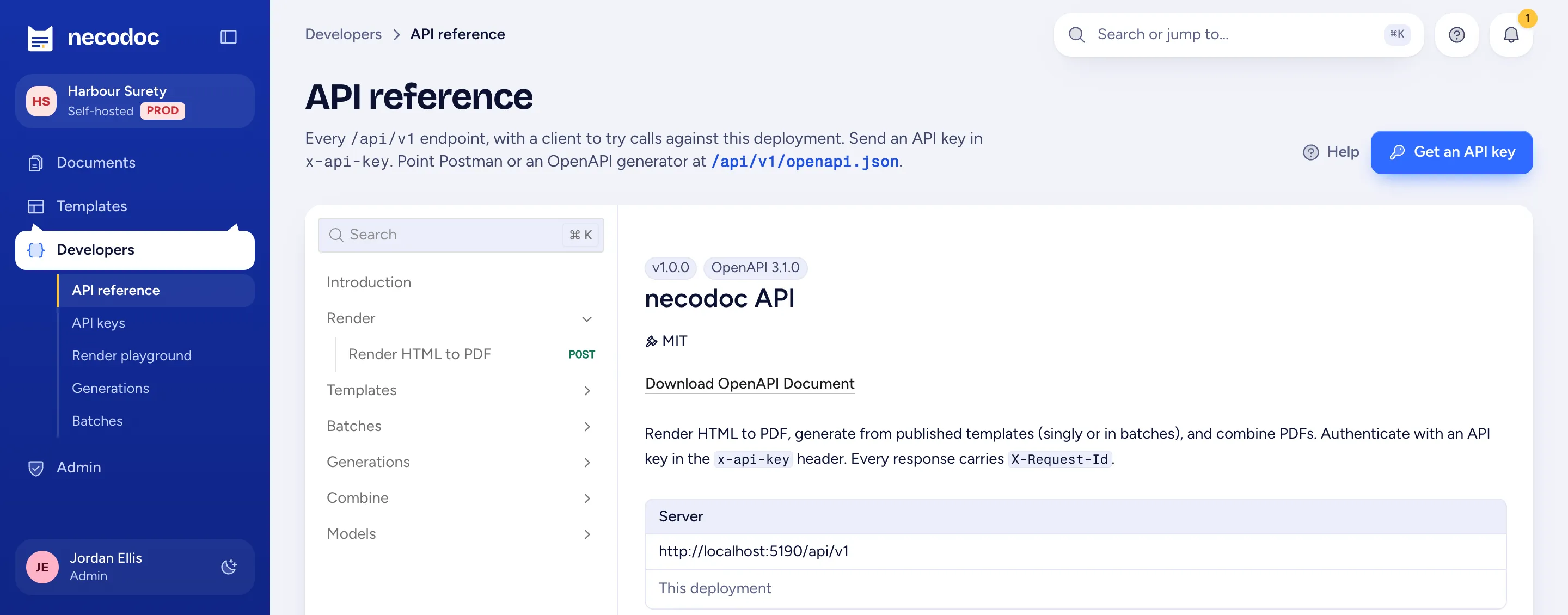
In-app API reference: render, templates, batches, generations and combine endpoints, OpenAPI 3.1

05Batches and the queue

Ten thousand renewals behind the day's interactive work.

Scale render workers with the volume. None of them needs a licence.

  • Batches of up to 10,000 rows from JSON or CSV, with progress and cancel
  • Invalid rows fail alone; download a ZIP or one combined packet
  • Interactive renders jump ahead of batch rows
  • A job on a killed worker retries on another

About 43,430 documents per minute on 8 workers, one per server. One worker on Apple M5 does 5,950.Method and caveats

Limit: Postgres carries the queue, so it bounds throughput. A batch input is capped at 20 MB.
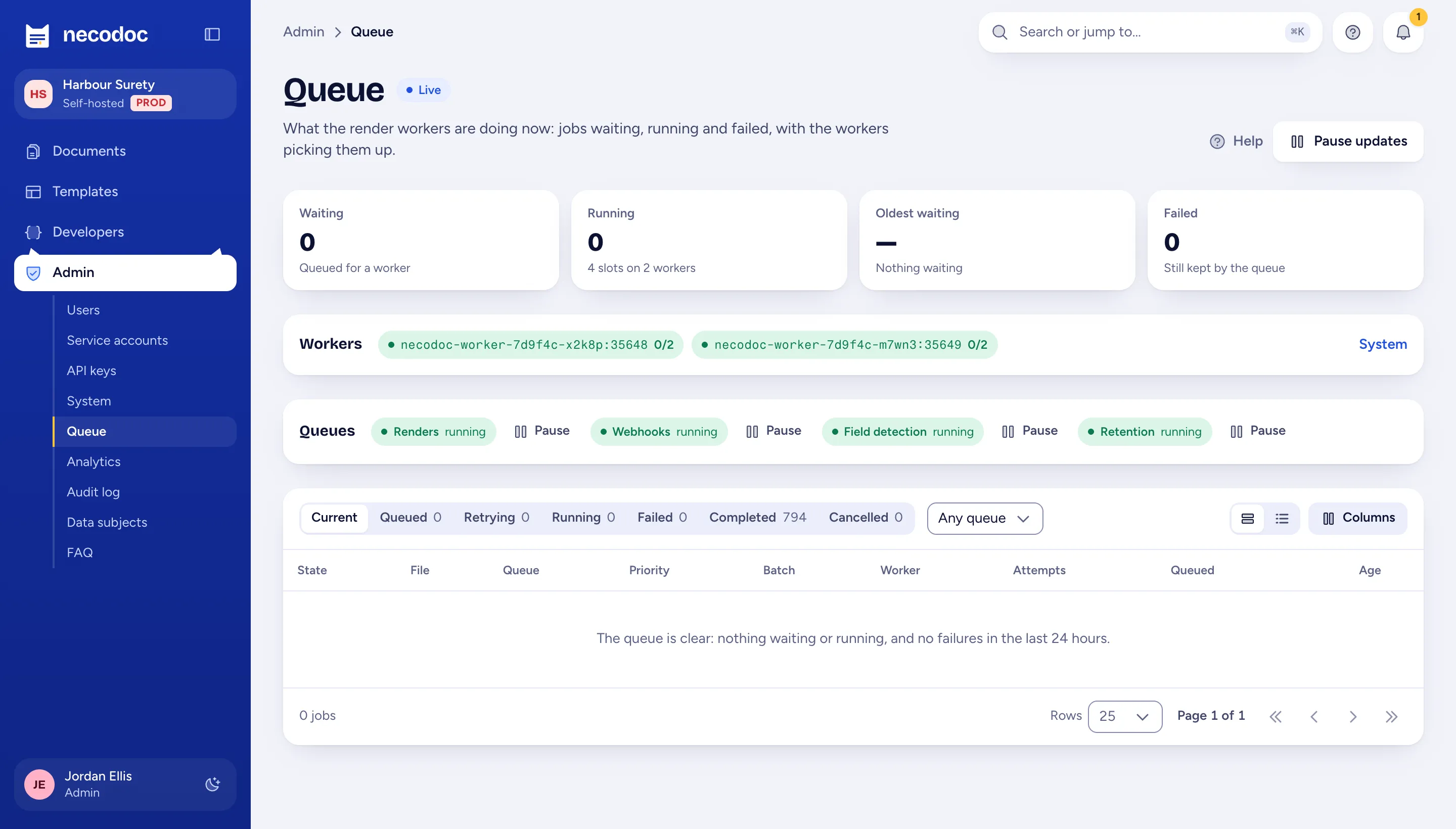
Admin queue page: waiting, running and failed jobs, workers and queues

06Signing packages

E-signature ready: the envelope, built for your provider.

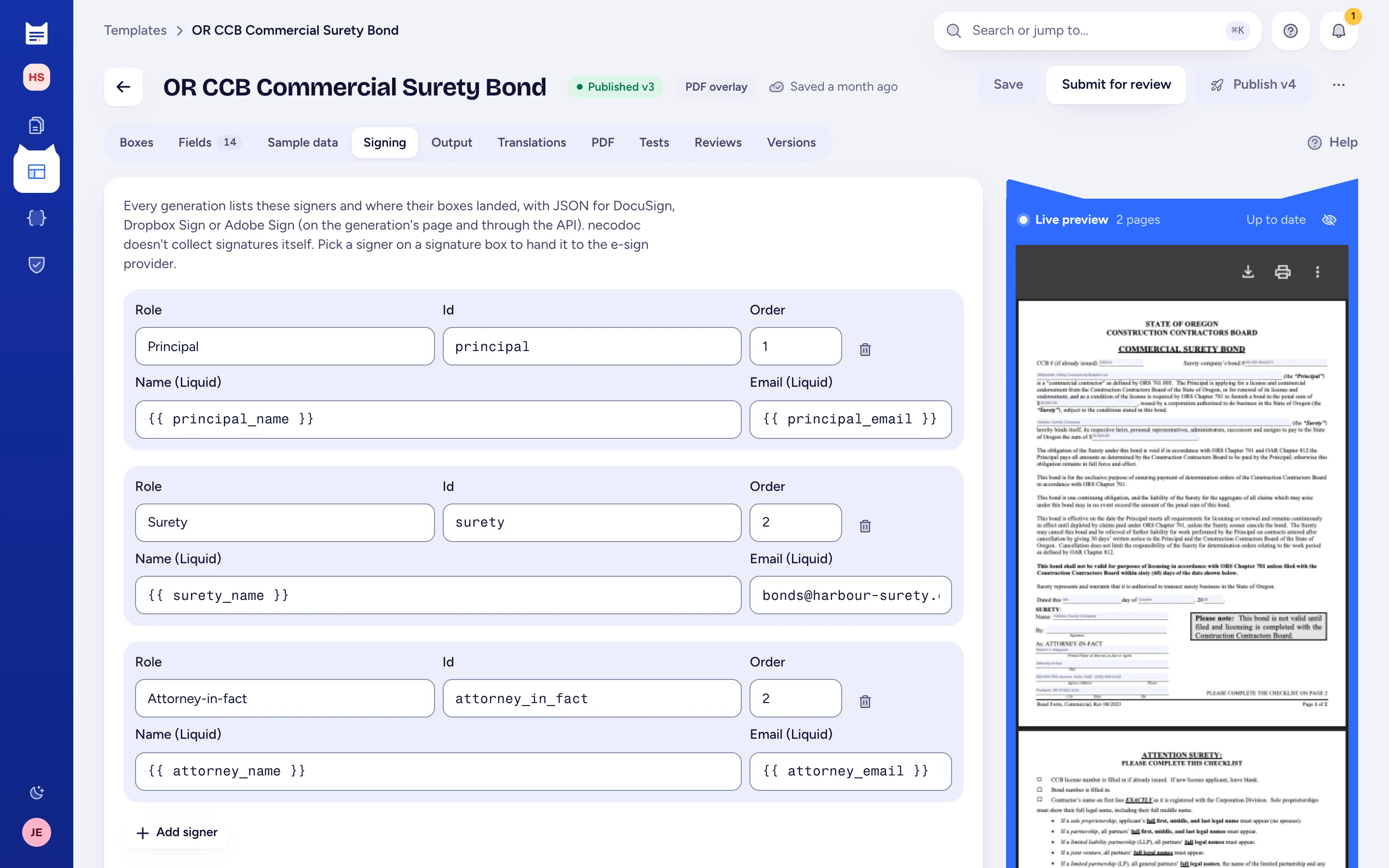
Templates declare signers and sign boxes. Each generation can return envelope JSON, with every box's position, for DocuSign, Dropbox Sign or Adobe Acrobat Sign.

  • Signature, initials, date signed, full name and signer text boxes
  • Signers with a routing order: principal, surety, attorney-in-fact
  • Exact positions on overlays; within about a point on designed documents
E-signature ready: your provider runs the legally binding signing, checks signer identity and keeps the signing audit trail.
Signing tab: principal, surety and attorney-in-fact signers with routing order

Output

Archival, accessible and bilingual PDFs.

Set the output profile on the template. A request can override it.

Archival and accessible output

PDF/A-2, PDF/UA-1, PAdES certification

PDF/A-2b or 2u, tagged PDF/UA-1, and PAdES B-B or B-T certification with your certificate. Each generation records the profiles it applied.

Limit: PDF/A on an overlay depends on the uploaded form embedding its fonts. There is no built-in validator; use veraPDF to prove conformance.
Archival output →

Localization

EN and fr-CA from one template

Translations live in the template and are reviewed with each version. The request picks the language, and dates, numbers and currency follow it. Right-to-left languages work too.

Limit: No plural forms in translations yet. Overlay text isn't shaped for right-to-left scripts.
Document localization →

Packets

Combine PDFs into one

Merge generated documents and uploaded PDFs in the order you set, from the API or as a batch delivered as one packet.

Limit: No bookmarks, table of contents or page renumbering across the packet. Form fields are flattened.
Combining PDFs →

Change control

The business owns the wording. Your systems own the fields.

A wording change can't change what the API accepts until someone publishes a new version.

Versions

One draft, immutable published versions

Editing and publishing are separate permissions. The API and the form always fill a published version, never the draft.

Limit: One draft per template; two editors on it overwrite each other, with a warning.
Publishing and versions →

Review

A review gate before publish

A reviewer sees what changed (structure, pages, tests) and approves or asks for changes. With the gate on, only an approved, unchanged draft publishes.

Limit: One review step and one open review per template. No multi-step or assigned approvals.
Review and approval →

Test cases and visual diff

Catch the change that breaks a document

Named data sets with checks (page count, text it must or mustn't contain) run on the draft. A page-by-page visual and text diff compares it with the published version.

Limit: The diff compares the latest published version only, page by page at the same index, up to 20 pages.
Test cases and visual diff →

Template assistant

Describe the document; review each change

A chat panel that edits fields, content, header and footer, page settings, theme and translations. The author accepts or rejects each change.

AI template assistant →

Field detection

Boxes proposed on a flat form

AI proposes where the blanks are and what they hold. An editor accepts, moves or drops each one.

PDF overlay templates →
What AI sends, and to whom. With ANTHROPIC_KEY set, the assistant sends the draft template (fields, content, sample data) and the conversation to Anthropic's API. Field detection sends page images of the uploaded form. Generation data isn't sent. The audit log records each AI request. Without the key, none of this runs. Data flows

Share links, webhooks, SDKs

Ways in and out besides the API call.

Share links

A form for someone without an account

A broker or applicant fills the guided form through a public link, and you get the submission and the PDF. Links can prefill and lock fields, and can expire.

Limit: No identity check on the filler and no email: you send the link yourself.
Share links →

Webhooks

Signed callbacks when work finishes

Set them per API key, account or template. Each delivery is HMAC-SHA256 signed over the timestamp and body, retried and logged.

Limit: Order isn't guaranteed, and an event can arrive twice. Deduplicate on the delivery id.
Webhooks →

SDKs

TypeScript, Python, .NET and Java

Generated from the OpenAPI document every deployment serves at /api/v1/openapi.json.

Limit: Not on npm, PyPI, NuGet or Maven Central yet; install from a checkout.
SDK reference ↗

Admin

Users, keys, logs and the queue in one place.

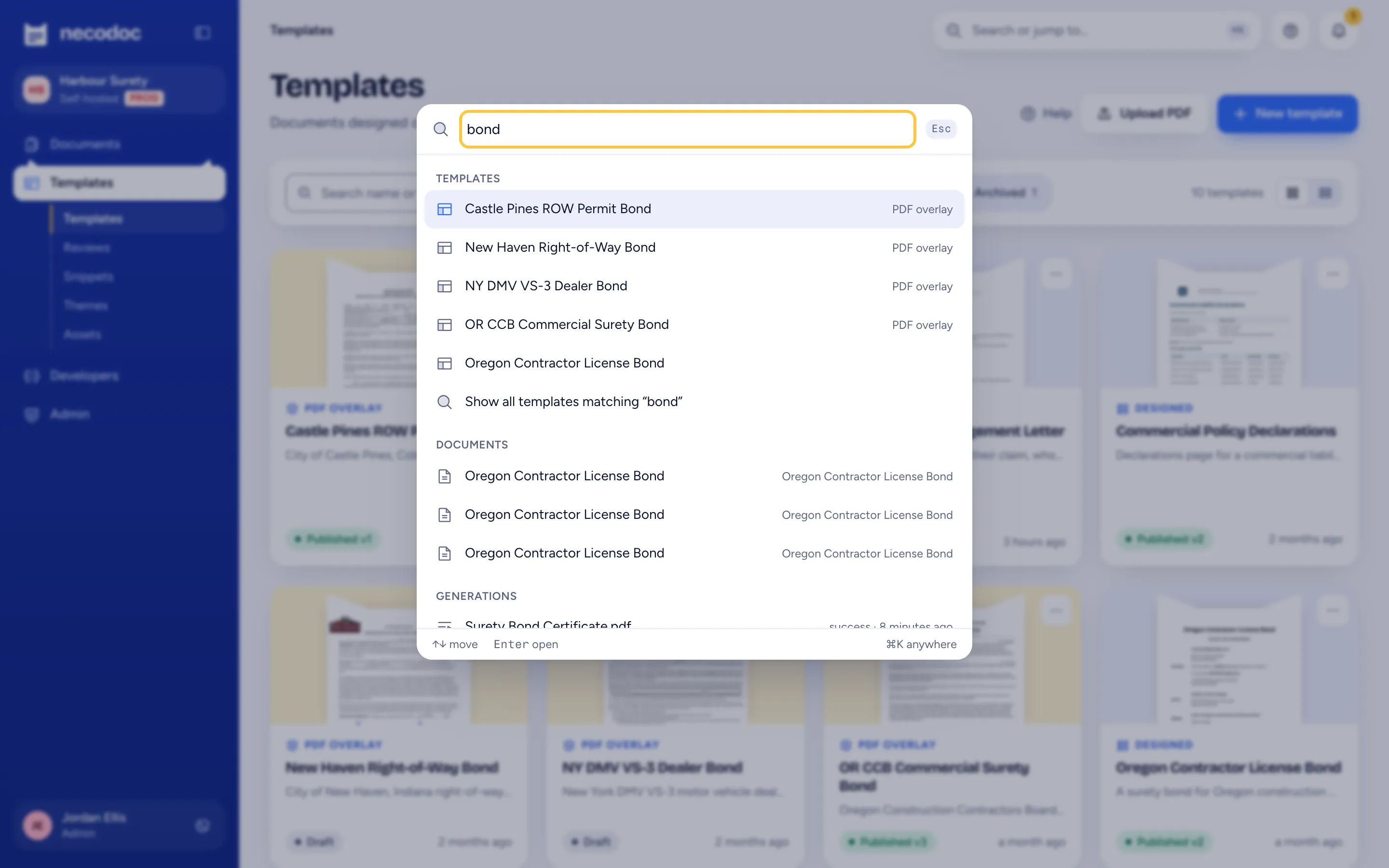
Roles, service accounts and system settings live there too. Press ⌘K or Ctrl+K to jump to any page.
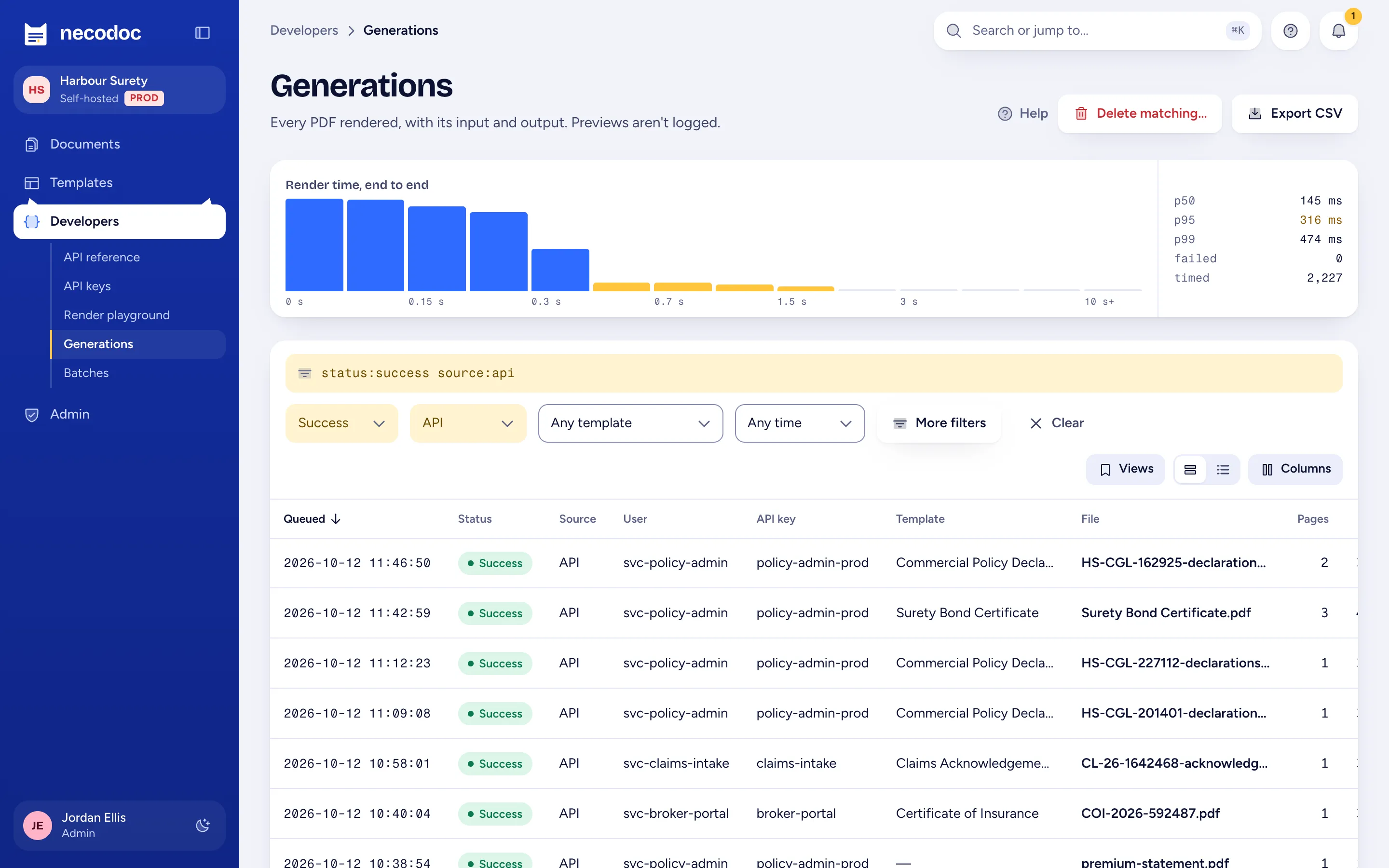
Generation log with a render-time histogram and p50, p95 and p99
Command palette: typing bond lists matching templates and documents

Audit log

Who changed what, with diffs

Configuration and access changes, sign-ins and failures, impersonation and API key use. A database trigger keeps it append-only. Exports to CSV.

Limit: Tamper-resistant, not tamper-evident: a DBA can disable the trigger.
Audit log →

Generation log

Every PDF, re-runnable

Source, caller, template version, input, output and a timing breakdown for every render, with a render-time histogram and p50, p95 and p99.

Limit: Inputs can hold personal data. Set a retention period, and mark sensitive fields so necodoc masks them.
Generation log →

Analytics

Volume, errors, sign-ins, key use

Dashboards for generation (volume, render times, errors, top templates, batches) and for access (sign-ins by provider, failures, active users, key use). Every chart has a table and CSV.

Limit: Counted from the logs, so deleted log entries drop out of the figures.
Analytics →

Saved views

Filters, sort and columns under a name

Save a view of the generation log or the audit log and reopen it from the toolbar. Admins can share a view with everyone.

Limit: Shared means everyone; there is no per-team sharing.
Saved views →

Try it

Every feature on this page ships in the MIT-licensed build.

No paid tier, and nothing held back for an enterprise edition.